Opera (Windows) - Clearing Saved Passwords and Form Data

This document explains how to clear saved passwords and form data in Opera 9 through 11.

Opera 10.50, 11, and Newer

Opera does not store form data.  All passwords are stored within its Password Manager.

  1. Click on the Opera button in the top left corner > Settings > Delete Private Data...

    Opera button in top left > Settings > Delete Private Data... at the bottom

  2. Click on Detailed Options to show the rest of the options. Make sure only Clear Password Manager is checked, then click on the Delete button.
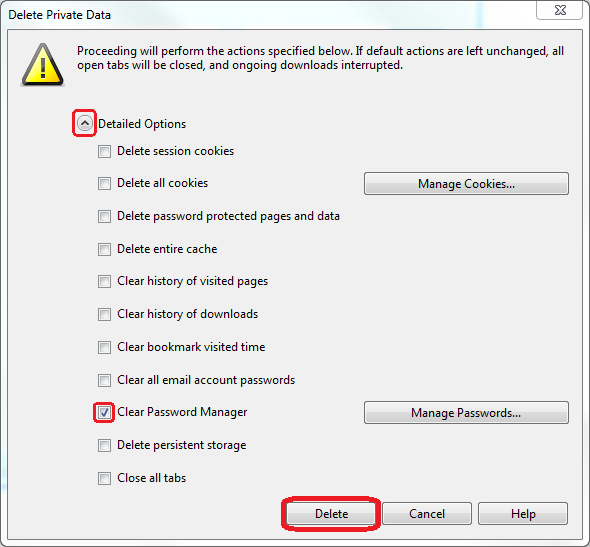
    In the new window, Clear Password Manager under Detailed Options is emphasized. The delete button is near the bottom right.


    Keywords:
    opera clear clearing remove removing delete password passwords form data 9 10 11 autofill 
    Doc ID:
    26488
    Owned by:
    Help Desk KB Team in DoIT Help Desk
    Created:
    2012-09-18
    Updated:
    2026-06-11
    Sites:
    DoIT Help Desk, University of Illinois System